
As AI tools become more capable, the conversation in financial services has moved from experimentation to adoption. Many firms already have access to AI assistants, but are now looking for ways to apply AI across more complex workflows and generate consistent business value.
As a mid-market financial services firm researching what you can do with Claude Cowork, it’s likely that:
- You have workflows across onboarding, relationship management, or reporting that you want to improve with AI, but tools like ChatGPT or internal copilots still require constant prompting and manual oversight.
- You’re trying to manage AI across multiple business units and regulated workflows, while balancing governance, auditability, and operational risk.
- You’re unsure which workflows Cowork can handle out of the box, where teams still need technical support, and when custom AI development becomes necessary.
If these challenges sound familiar, you might already be testing Anthropic tools like Claude for Financial Services, Cowork or Claude Code across parts of your organization, but struggling to turn individual usage into consistent operational value.
In this article, we explore how financial services firms can use Claude Cowork to operationalize AI across teams, support complex workflows, and move from isolated experiments toward more scalable adoption.
Read on to discover:
- How does Claude Cowork work for Financial Services?
- Top Use Cases of Claude Cowork in Financial Services
- When Does it Make Sense to Use Claude Cowork in Financial Services?
- What to Take into Consideration Before Using Claude Cowork
- How Neurons Lab Helps You Use Claude Cowork
- How a Thai Financial Institution Built Agentic AI Capability through Enablement Training
- FAQs
Curious about what you can do with Claude Cowork in financial services? Get in touch with Neurons Lab to discover more.
How does Claude Cowork Work for Financial Services?
Claude Cowork helps financial services teams execute multi-step workflows across different systems, files, and data sources in a single AI-assisted workflow.
Instead of handling one prompt or task at a time, Claude Cowork can work across internal documents, spreadsheets, CRM platforms, Microsoft 365, Google Workspace, and external financial data sources like Bloomberg or FactSet during the same process. This makes it useful for FSI-specific workflows such as investment research, borrower analysis, and compliance reviews that require multiple datasets and documents from different sources.
Unlike cloud-only assistants like Microsoft Copilot or Google Gemini, Cowork sits within the Claude desktop application and works across both cloud and desktop ecosystems. This allows financial services teams to combine local file systems, internal tools, and external systems inside the same workflow instead of switching between disconnected prompts and applications.
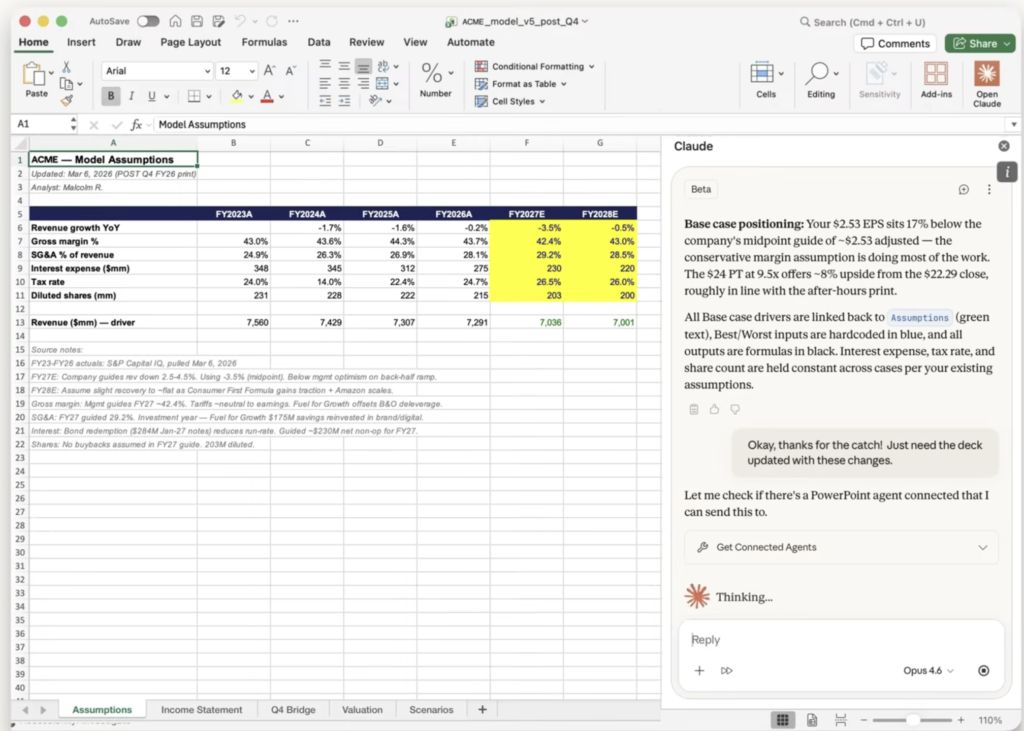
Claude Cowork creating a borrower financial spread and covenant analysis in Excel – Source: Anthropic
Claude Cowork also turns human SOPs into AI-native workflows you can reuse. Teams can set up scheduled tasks and save instructions, formatting rules, workflow steps, and supporting files as reusable capabilities that can be applied consistently across departments.
Together, these capabilities help financial services firms move from isolated AI experimentation toward more operational and scalable AI adoption.
Top Use Cases of Claude Cowork in Financial Services
For financial services firms, Cowork can support productivity in front-office, middle-office, and back-office teams, with use cases spanning client coverage, advisory, research and modelling, finance operations, compliance, and onboarding.
Here’s how to use Claude Cowork in financial services:
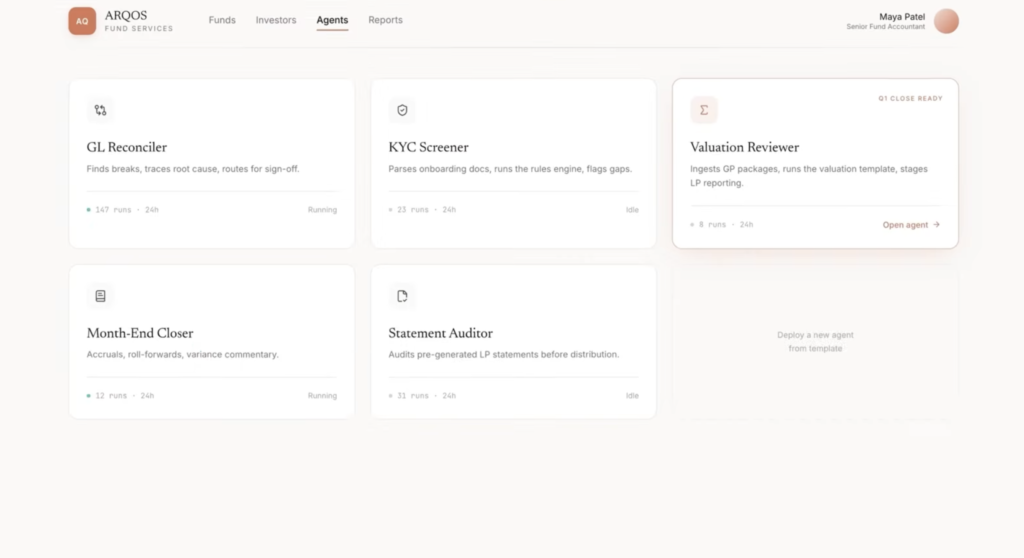
A library of reusable Claude Cowork agents for finance, KYC, reconciliation, and reporting – Source: Anthropic
1. Increase Client Coverage
- Prepare pitches: Investment bankers and advisory teams can have Claude Cowork build target lists, run comparables, review precedent transactions, pull relevant market context, and draft pitchbook content, all in one workflow. This cuts down on manual research and formatting work, enabling teams to produce better quality pitch materials faster and freeing up time for more deal strategy and client conversations.
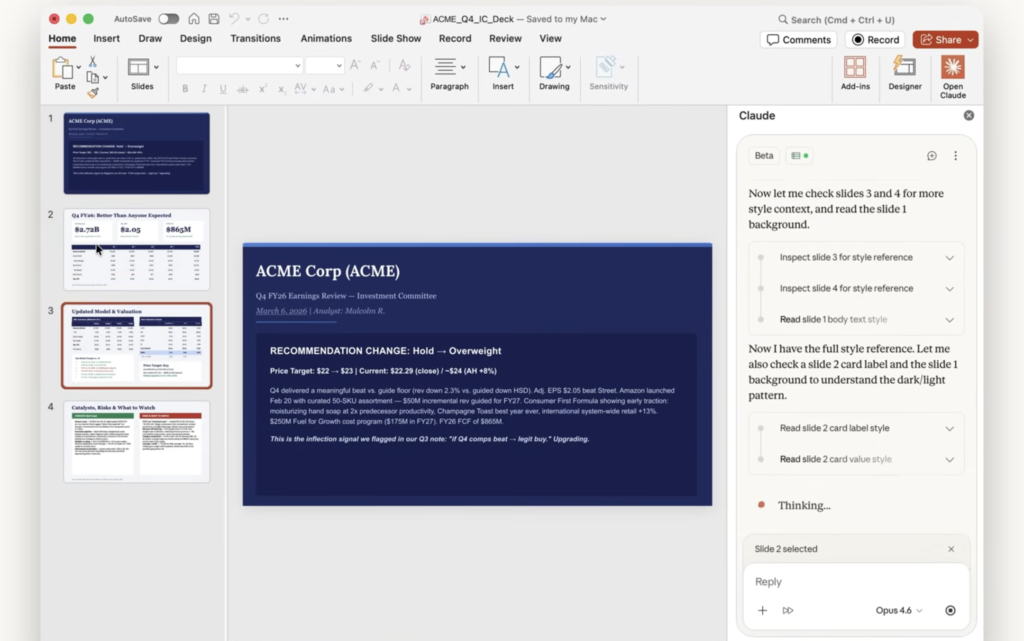
Claude Cowork working inside PowerPoint to update an earnings review deck – Source: Anthropic
- Get ready for meetings: Claude Cowork can pull together client history, CRM notes, recent emails, market updates, transaction context, and counterparty information ahead of meetings. Relationship managers spend less time gathering information and more time focused on client conversations, identifying opportunities, and relationship coverage.
2. Speed up Research, Reviews, and Model Building
- Market research: Analysts and research teams can use Claude Cowork to monitor sector updates, broker research, and internal notes at once. It can then surface items for credit, risk, or investment review, helping teams flag relevant changes faster and respond earlier to risks, opportunities, and market movements.
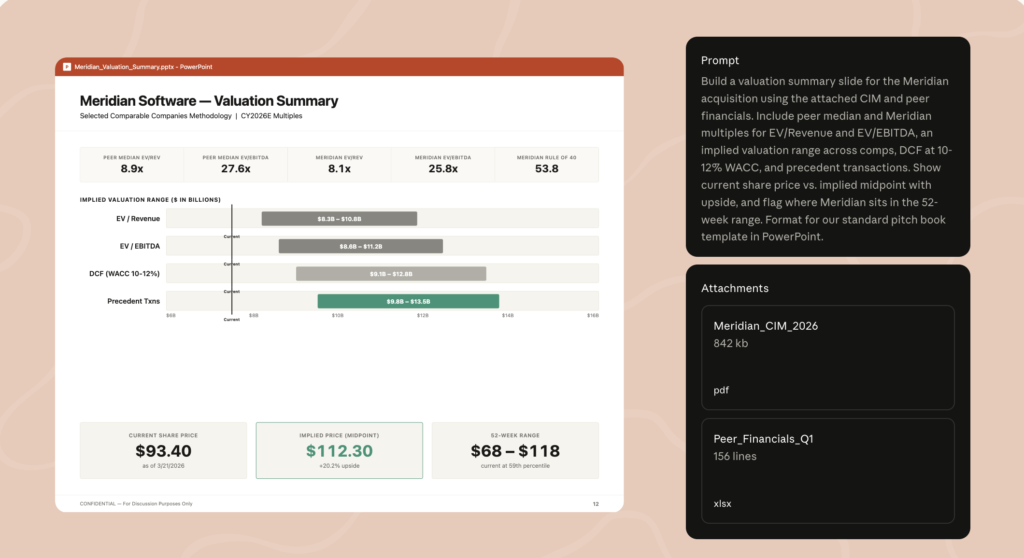
Claude Cowork creating a valuation summary slide from CIM and peer financials – Source: Anthropic
- Review earnings: Claude can help investment teams work through earnings transcripts, filings, and investor materials to identify guidance changes, performance shifts, and thesis-relevant updates. Teams produce earnings notes faster and focus review time on what changed, why it matters, and what to do next. This helps support faster and better-informed investment decisions.
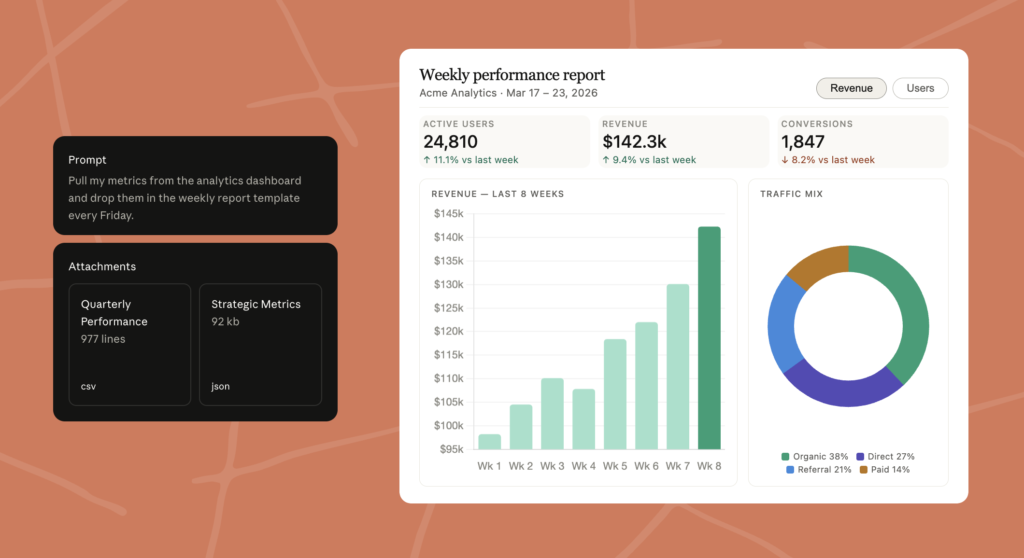
Claude Cowork pulling dashboard metrics into a weekly performance report – Source: Anthropic
- Build financial models: Analysts and modelling teams can create and maintain financial models by drawing on filings, data feeds, and analyst inputs in a single workflow. Claude Cowork can also help write code, such as Python scripts, to support model creation. This reduces repetitive model-building work while keeping teams accountable for reviewing assumptions, formulas, and final outputs. It also gives teams more capacity for higher-value analysis.
3. Improve Operations Across Valuations, Reconciliations, Closes, and Onboarding
- Review valuations: Finance and fund teams can check valuations against comparables, methodologies, supporting documents, and internal review standards across multiple sources. Teams can catch inconsistencies earlier and can create valuation packs faster, reducing rework and supporting more confident reporting.
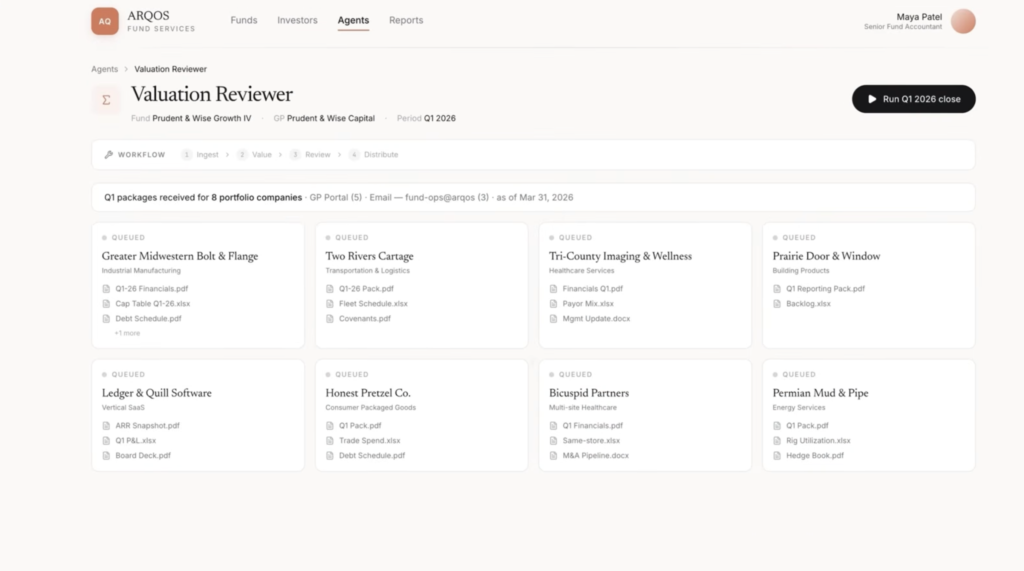
Claude Cowork managing valuation review workflows across fund portfolio companies – Source: Anthropic
- Reconcile the general ledger: Accounting teams can have Cowork compare general ledger accounts against subledgers, bank statements, books of record, and supporting schedules. They can find breaks faster, trace likely causes more easily, and route issues for sign-off with clearer supporting evidence. This shortens investigation time and reduces close delays.
- Generate month-end close work reports: Finance departments can run close checklists, prepare journal entry drafts, create roll-forwards, and produce variance commentary and close reports in less time. This cuts manual close work, helps teams prepare reporting packs faster, and delivers reporting to stakeholders faster.
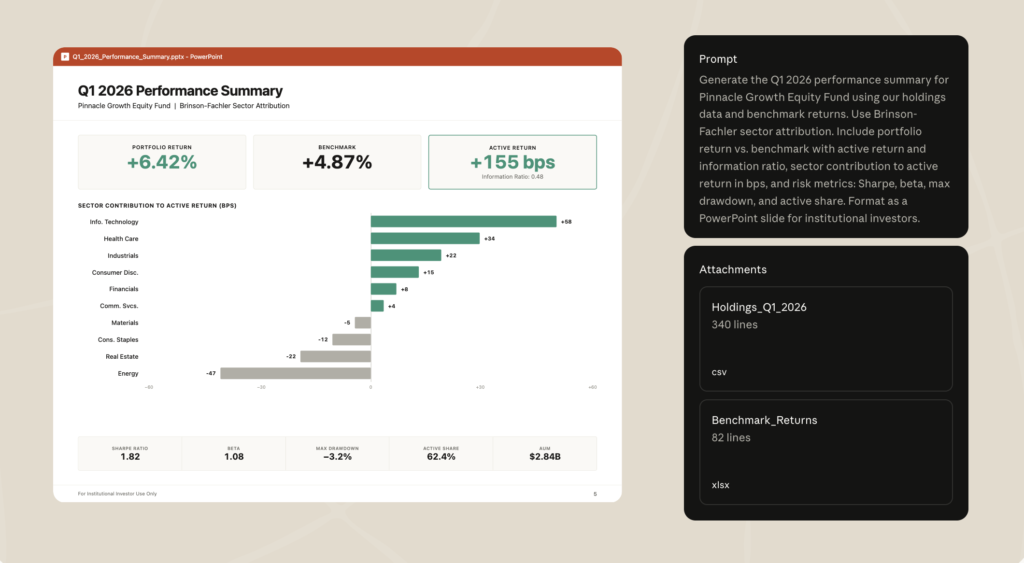
Claude Cowork generating an investor-ready performance summary from holdings and benchmark data – Source: Anthropic
- Audit statements: Finance and reporting teams can use Claude Cowork to review statements for consistency, completeness, calculation issues, formatting gaps, and audit readiness before they go out. Teams can improve statement quality before distribution, strengthening trust with auditors, regulators, and investors.
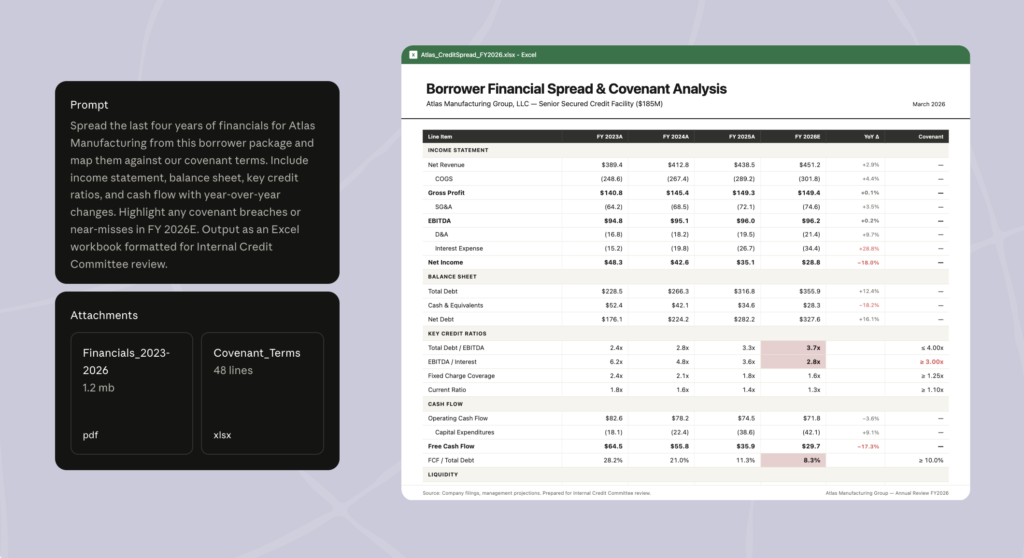
Claude Cowork creating a borrower financial spread and covenant analysis in Excel – Source: Anthropic
- KYC screening: Claude Cowork helps operations and compliance teams assemble entity files, review source documents, check onboarding requirements, and flag missing information as part of a structured workflow. In turn, they can process onboarding files faster while keeping human oversight in place on risk decisions. This reduces account or loan processing delays and improves the client experience.
- Create reports and presentations: Cowork can combine internal data, market research, economic releases, and portfolio information to draft quarterly macro reports, investment updates, board materials, and client presentations. This reduces the time spent collecting information and formatting outputs, allowing teams to focus on analysis, recommendations, and stakeholder communication.
When Does it Make Sense to Use Claude Cowork in Financial Services?
If your goal is to use AI to support everyday tasks like summarizing documents or drafting emails to help teams work 10% faster, tools like Microsoft Copilot or Google Gemini may be enough. However, if you want to operationalize AI across complex tasks and see greater productivity gains across teams, Claude Cowork becomes a stronger fit.
To illustrate how it tackles complexity, consider a relationship manager who typically works across Excel models, pitch decks, email threads, CRM records, market data, and internal documents to prepare for a client meeting.
With Claude Cowork, the relationship manager can ask for a briefing pack in PowerPoint or Google Slides that draws from those tools and sources at the same time, summarizes key updates, highlights client opportunities, and drafts talking points. Instead of stitching the work together manually over several hours, they get a relevant and usable first version ready for review in minutes.
For a wealth management firm with 10 relationship managers, saving even two hours of prep each week gives the team 20 extra hours for client calls, follow-ups, portfolio reviews, and new opportunity discussions. Over time, those reclaimed hours can support stronger client coverage (and client satisfaction), more consistent outreach, and growth in assets under management.
Who Should Use Claude Cowork?
Claude Cowork is built for non-technical teams, so you don’t need to be a software engineer to use it. You do, however, need what we at Neurons Lab call an “architectural mindset”. This means thinking clearly about how data sources connect, what workflows you want to automate, and how to orchestrate Cowork across those moving parts.
For example, investment banking teams may use Claude Cowork for pitch preparation, analysts for research and financial modelling, wealth teams for meeting preparation, finance teams for reconciliations, and compliance or operations teams for onboarding and KYC workflows.
But as you expand use of Cowork across departments, it moves from an individual productivity tool to an operational capability that spans multiple workflows, teams, and risk environments.
So it’s critical to think beyond individual use cases before rolling Cowork out more broadly, and start considering how you’re going to manage it across the organization.
What to Take into Consideration Before Using Claude Cowork
Once Claude Cowork starts supporting workflows across multiple teams and departments, it’s important to think about how AI usage will be adopted, managed, and governed at scale. Before rolling it out more broadly, here’s what to consider:
- Not everyone will have an architectural mindset, but it can be taught: Teams may know their workflows, but not how to support them with AI. Investing in enablement training can help FSI teams apply Cowork to their roles more effectively to ensure greater productivity gains and more consistent use across the business.
- A consistent evaluation process helps keep AI reliable: AI performance can change as workflows, data sources, and business requirements change. Regular evaluations help teams check output quality, monitor drift, update skills, and keep Cowork reliable for regulated work involving client data, financial analysis, compliance, or reporting.
- Claude Cowork still depends on human direction and oversight: Cowork can run long, multi-step tasks, but people still decide when workflows begin, which data sources it uses, and how outputs are reviewed. This allows teams to use AI to support operations while staying accountable for the final result.
- Plan for governance as Cowork expands: As different teams build their own workflows, AI capabilities, and review standards, AI can become difficult to manage. Building a shared AI governance layer enables you to scale Cowork across departments, while controlling operations, compliance, and risk.
- Claude alone may not be enough for every workflow: Some use cases may require AI to run continuously in the background or respond to events inside operational systems like CRMs or onboarding platforms. For these complex use cases, consider moving to custom agents once you’ve tested and refined them with Cowork.
For financial services firms, the challenge is not only adopting Claude Cowork but scaling it effectively across teams, workflows, and regulated environments. That’s where the right AI enablement and implementation partner becomes important.
How Neurons Lab Helps You Adopt Claude Cowork in Financial Services
Claude Cowork can help financial institutions move beyond one-off AI tasks and support more operational workflows across teams. But getting real value from it takes more than access to the tool itself.
Scaling it across your organization depends on how consistently teams apply it across processes and regulated environments. That’s the gap Neurons Lab helps close.
Neurons Lab is a UK and Singapore-based Agentic AI consultancy serving financial institutions across North America, Europe, and Asia. As an AI enablement partner, we design bespoke workshops and build and implement agentic AI solutions tailored for mid-market FSIs, including investment banks, wealth management firms and capital markets.
Trusted by 100+ clients, such as HSBC, Visa, and AXA, we co-create agentic systems that run in production and scale across your organization. Here’s what you can do with Claude Cowork by partnering with us:
Move Claude Cowork into your FSI Workflows With Tailored Enablement and Training
It’s difficult to get business value from AI when teams use it for one-off tasks and have to keep prompting it across separate tools, files, and systems. With Neurons Lab, you can set up Cowork for complex FSI workflows such as financial analysis, client meeting prep, market research, due diligence, and reporting.
Through our AI enablement service, we provide role-specific training workshops for executives and financial services teams. Leaders gain clarity on how Cowork fits with your firm’s business goals, so they can set the direction for AI across the firm.
Meanwhile, client-facing advisors, trading desks, and other teams learn how to use Claude Cowork for their own workflows. This includes understanding how to connect data sources, design multi-step flows, and build reusable AI capabilities.
For example, an investment banker preparing a pitch won’t have to manually pull market data, review company filings, check internal deal notes, and generate each output separately in Microsoft Copilot. Our role-specific training shows them how to set up Claude Cowork around that workflow, so once the banker triggers the task, Cowork can work through the steps in the background and produce a draft pitch in minutes.
As this same shift happens across multiple teams and departments, the impact compounds.
Finance teams, researchers, and operations teams spend less time on manual tasks, repeated prompting, and system-switching. And that’s how you start seeing stronger productivity gains from AI across your operations.
Scale Claude Cowork Consistently with Shared Governance
As a financial services firm, a key challenge is knowing how to measure AI performance and govern workflows that involve multiple teams across different departments. Neurons Lab helps you address this with shared governance.
You establish this through a top-down and bottom-up approach. By working first with your executives on alignment and then with teams for correct usage, you enable consistent use as well as reusability of AI capabilities across the organization. This reduces fragmented AI usage and helps operationalize AI within your business.
Once Claude Cowork is in use, you’ll bring the bottom-up view back to leadership. Leaders see how teams are using Cowork, how their workflows have changed, and what they need to govern going forward. This includes who can add new workflows, who monitors performance, and who is responsible for outputs.
You also have our help setting up an evaluation framework to check whether AI outputs are accurate enough for high-stakes work such as financial analysis, due diligence, client research, compliance documentation, and financial modelling. That way, you can spot performance drift, update data connections, and improve AI performance over time.
With this structure in place, Claude Cowork can scale consistently across regulated workflows without losing control over compliance, output quality, or human accountability.
Get Both Claude Cowork and Custom Development Support From An AI and FSI Specialized Partner
Like many financial services firms, you might not be sure which use cases Claude Cowork can handle, which ones need extra technical support, and which ones require custom development.
Neurons Lab supports you across all three scenarios.
We bring real deployment experience across financial services workflows like wealth advisory, KYC and onboarding, contact center automation, claims, compliance, and management workflows. This means you get guidance grounded in financial services, not generic AI advice.
You’re also not limited to Cowork’s out-of-the-box capabilities. When a workflow is more complex, such as proactive client monitoring triggered by CRM changes, automated equity research, or financial model generation in Python, you can build custom agents with a partner that has already deployed custom AI agents for financial services.
Explore our customer success stories
A custom agentic AI solution built specifically for relationship managers by Neurons Lab
Our enablement-to-custom-development approach helps you test a workflow with Claude Cowork first. Once the use case is proven and the business case is strong enough, we help you move it into a custom agent. That way, you don’t over-invest early and only build on what has already been validated.
For example, an equity research workflow that spans reviewing the latest filings to drafting a research summary might start in Cowork as a human-triggered process. The analyst reviews the output, checks the assumptions, and decides what should be shared or added to the final note. If you want that workflow to run with greater autonomy, Neurons Lab can help turn it into a background agent.
Instead of needing an analyst to start the task each time, the agent can run automatically when CRM data changes, new market information becomes available, or a relevant company update is published.
Learn more about our custom agents services
How a Thai Financial Institution Built Agentic AI Capability through Enablement Training with Neurons Lab
A leading Thai financial institution wanted to help quantitative research teams use Agentic AI safely and effectively across quantitative analysis, investment workflows, risk review, and supervisory processes. This included finding practical ways to use AI to:
- Summarize financial documents
- Prepare structured outputs
- Support stress-testing processes
- Analyze large volumes of reports from governments, central banks, and research organizations
- Enrich analysis with up-to-date web and financial data
- Use gathered insights to build financial models
Neurons Lab trained the quantitative research team on how to use LLM tools, including Claude AI and Cowork, for agentic workflows specific to their way of working. The training covered LLM fundamentals, prompt engineering, applied use cases, governance principles, verification methods, and checklists for responsible adoption.
The team practiced summarization, constrained generation, and modelling support for investment and risk processes. They also learned how to verify outputs and apply agentic AI responsibly in regulated financial work.
By the end of the training:
- 25+ participants across 3+ domains learned how to use Claude for their processes, including quantitative analysis, investment workflows, and supervisory reviews.
- 97% of participants said they felt confident applying AI securely in their daily workflows.
Work with Neurons Lab to Deploy Claude Cowork Effectively in Your FSI workflows
Claude Cowork can help you automate time-consuming financial services workflows. But getting there takes more than using it out of the box. It helps to work with an AI enablement partner that understands both Claude Cowork and financial services. That way, you can move faster without overlooking operational, technical, and regulatory details like data access and auditability.
As an end-to-end AI consultancy, Neurons Lab gives you hands-on support from strategy to execution. We help you identify the right Claude Cowork use cases, train teams by role, build reusable AI skills, set up governance, evaluate outputs, and support custom development when a workflow needs more than Claude Cowork can handle. This gives you a structured way to deploy Claude Cowork across FSI workflows and turn adoption into measurable productivity gains.
If you’re considering Claude Cowork, Neurons Lab can help you assess how it fits into your workflows, how to set up, use, and scale it reliably across your firm. Let’s talk.
FAQs
Can non-technical financial services teams set up Claude Cowork?
Claude Cowork is designed for non-technical users, so analysts, relationship managers, finance teams, and operations teams don’t need to be software engineers or have programming skills to use it. But teams still need to understand how workflows, data sources, and tools connect across their day-to-day work. That’s why many firms choose to provide enablement training to help teams apply Claude Cowork effectively across operational and regulated workflows.
Does Claude Cowork work with financial services firms’ legacy systems?
Claude Cowork is a desktop app that can interact with legacy systems. However, it depends on how those systems are accessed, what permissions are required, and whether secure connectors, APIs, or browser-based access are available. For example, if a team needs to pull information from a legacy CRM, government registry, or internal portal, Claude Cowork may help with parts of the workflow through connected tools or approved browser-based access.
How can financial services firms govern Claude Cowork use across teams?
Financial services firms can govern Claude Cowork by combining a top-down and bottom-up approach to create shared governance. Leadership sets the AI roadmap. Then teams apply the roadmap to their own Claude Cowork workflows. Once teams start using Claude Cowork, leadership applies an evaluation framework to ensure continued visibility into what teams have built, how workflows have changed, and how AI needs to be managed going forward.